What you end up with
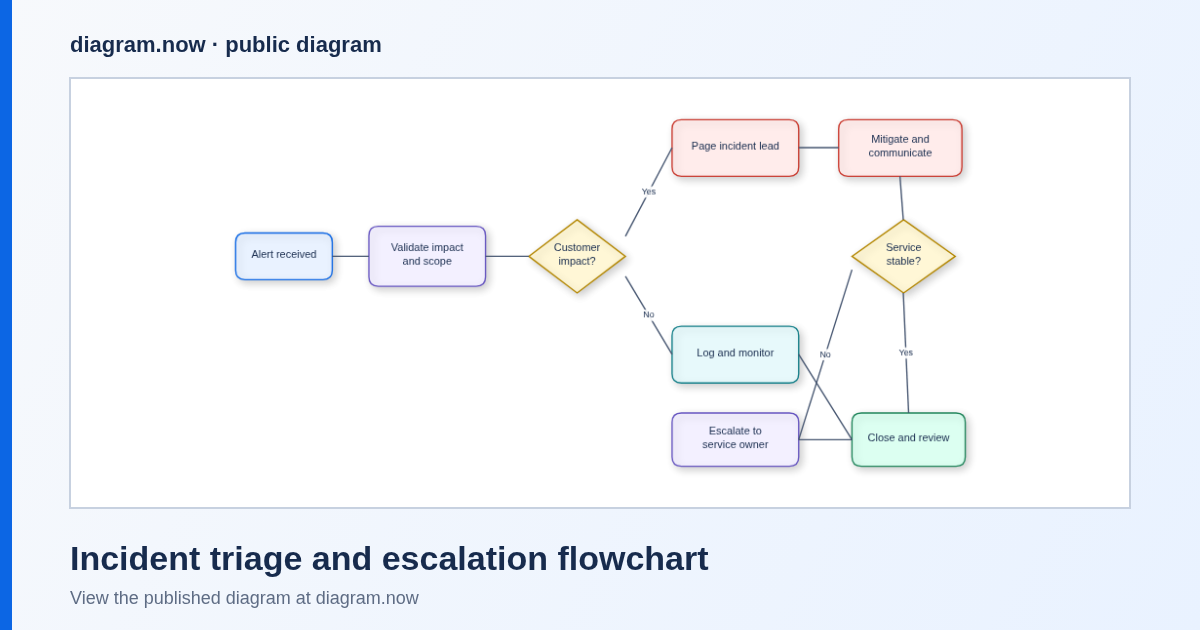
A flowchart your team can actually keep: real shapes and connectors, not a flat picture. Renaming a step, moving the decision diamond or adding an escalation branch is a double-click, so the diagram survives the next process change instead of going stale.
Tested 9 September 2026 in the live editor. Opening the published incident triage example and clicking Edit a copy loaded 19 objects — 9 step and decision shapes plus 10 connectors. Renaming the first step kept all 19 in place. Pasting a five-node Mermaid flowchart added 10 more objects. produced a 19,207-byte diagram.diagramly file and PNG export produced a valid 271,975-byte PNG.
Write the process down first (two minutes)
The diagram is easy if the text is honest. Before you touch the editor, mark up the procedure you already have:
- One box per observable action — something you can point at and say “this happened”: Acknowledge page, Post status update.
- One diamond per decision that changes what happens next, with the answer written on the arrow: Customer impact? → yes / no.
- Name the owner where the process hands off: Page incident lead, Escalate to service owner.
- Draw the exits you are afraid of — the failed check, the timeout, the “still broken after mitigation” path. Those are the branches reviewers ask about.
- End at a state, not a vibe: Close and review, not “resolved”.
Route A — reshape a real flowchart
Fastest when your process is roughly the shape of an existing one. Every step below was run on the live example.
Open the example and take a copy
Open the incident triage and escalation flowchart, then click Edit a copy. The copy opens in the editor with all 19 objects — the published example stays untouched, and no account is needed.
Rename the steps to your words
Double-click a shape to edit it in place; Enter commits, Escape cancels. In the test run Alert received became Triage new alert and the object count stayed at 19, so the connectors stayed attached.
Delete what is not yours, then add what is
Strip the branches your process does not have. Add work with (a step), (a decision), (a swimlane label or note); drag from a shape’s edge to draw the next arrow. The test run’s took the canvas from 3 objects to 4.
Tidy the layout
Drag shapes into left-to-right reading order and use when the routing gets messy. Keep the decision diamond in the reading line so the branches read as a fork, not a tangle.
Save it as a file you own
(or Ctrl+S) downloads diagram.diagramly; reopens it later. That file is your insurance — a flowchart you can move between machines and teams without a licence conversation.
Route B — paste the process as Mermaid text
Use this when the procedure already exists as text, or when you would rather type than drag.
Open the Mermaid import
or opens the Import Mermaid dialog: “Paste Mermaid flowchart or graph syntax to convert it into editable diagramsnow shapes and connectors. Edge labels work best with the |label| syntax.” It also offers Load Mermaid File, and an import mode of Replace or Append.
Paste the flow
This is the exact text used in the test run — five nodes, one decision, labels on both branches:
flowchart TD
  A[Start incident] --> B{Page on-call?}
  B -- yes --> C[Acknowledge page]
  B -- no --> D[Escalate to backup]
  C --> E[Post status update]
  D --> E
Click Import Mermaid
The canvas went from 4 objects to 14: the five steps, the branch labels and the connectors, all normal editable shapes. Append keeps what is already on the canvas; Replace starts from the paste alone.
Then treat it like a drawing
Rename, colour, regroup and delete freely from here. The import is a starting layout, not a locked view — nothing stays tied to the text you pasted.
Share the finished flowchart
Three output paths, all verified in the editor on 9 September 2026:
PNG with the diagram inside
opens the Export as PNG dialog with Include grid and Include a copy of my diagram — on by default, which stores the editable diagram inside the PNG so can restore it later. The test export was a valid 271,975-byte PNG. SVG, XML, JSON, JPEG, WebP and PDF exports are in the same menu.
Link and embed
, and all open one Publish / Embed / URL dialog: “Generate a self-contained HTML file, an embeddable iframe snippet, or an encoded URL that reopens the current diagram in the published viewer or the editor.” Its own copy states that “URL exports keep the diagram payload in the URL fragment so nothing is uploaded from this browser”. Buttons include Copy Markdown / Slack / iframe / GitHub, Publish public page and Copy link.
Onto a Confluence page
The browser editor and the Confluence app are different products. A PNG or link goes onto any Confluence page today with no install; keeping the flowchart editable inside Confluence is the Marketplace app, which is its own install and price. The Confluence walkthrough explains both routes, and flowchart editor for Confluence covers the app side.
FAQ
How much of the written process survives the diagram?
Everything that is an action, a decision or a handoff. The published example holds 19 objects for a nine-step incident flow, which is a typical size for a runbook page. If a step is prose, it belongs in the Confluence page text next to the diagram, not inside a shape.
Can I do BPMN or UML activity diagrams instead?
Yes — the editor has both, with examples you can copy: BPMN diagrams in Confluence and UML diagrams in Confluence. The purchase-request approval BPMN example is a good swap-in if your audience reads swimlanes.
Does someone need an account for me to share it?
No. An encoded URL or a self-contained HTML file opens in a browser, and a published public page is a normal link. Saving a diagram.diagramly file and emailing it works too.
Is my process text uploaded?
Conversion runs in the editor in your browser tab. During the tested Mermaid and SQL imports the browser made zero non-GET requests and contacted zero third-party hosts. A public page or embed only exists if you click publish.
My process lives in a ticket template, not Mermaid.
Paste it into the Mermaid dialog as flowchart TD lines anyway — one line per step — or start from the example and rename. If you would rather have it done with you, bring that text to a free 20-minute observed session.
One process, one flowchart, same afternoon
Pick the procedure people most often get wrong, give every step a box and every fork a diamond, then keep the file. When the flowchart has to live in Confluence and stay editable there, the Marketplace listing covers the install and current rates.
Currently $0 for Confluence sites with up to 10 users. Bring one real diagram — Visio (.vsdx), Lucidchart, Mermaid or SQL — and we'll help you import it into Confluence in a free one-file migration session. Request migration help.