Keys become relationships
Foreign keys turn into crow's-foot connectors between entities, which is what makes the result a model rather than a box per table.
Paste CREATE TABLE statements into the free browser editor and get an editable entity-relationship diagram: one shape per table with its attribute list, joined by crow's-foot key relationships. Every step on this page was run in the live editor before it was published.
A diagram of real entities and keys that you can keep editing — not a screenshot of a schema. Attribute lists, renames, extra tables and layout are all yours afterwards, because the import produces normal editor shapes and connectors.
Tested 9 September 2026 in the live editor. The two-table example below produced 3 shapes: a projects entity, a tasks entity with its attribute list, and the crow's-foot relationship between them. Saving produced a diagram.diagramly file of 7,186 bytes, and PNG export produced a valid 70,808-byte PNG.
Open the free editor. No account and no install is needed for the browser editor.
Use or . Both open the same Import SQL ERD dialog, which says: “Paste SQL DDL to generate editable ERD entities with attribute lists and crow's-foot key relationships. CREATE TABLE, PRIMARY KEY, UNIQUE, FOREIGN KEY, and ALTER TABLE ... FOREIGN KEY statements are supported.” The dialog also offers Load SQL File and Use Sample.
Start with the 3–8 tables that matter to the decision you are documenting, not the whole database. This is the exact DDL used in the test run:
CREATE TABLE projects (
  project_id INT PRIMARY KEY,
  name VARCHAR(120) NOT NULL
);

CREATE TABLE tasks (
  task_id INT PRIMARY KEY,
  project_id INT NOT NULL,
  title VARCHAR(200),
  status VARCHAR(32),
  CONSTRAINT fk_tasks_project
    FOREIGN KEY (project_id) REFERENCES projects (project_id)
);
The entities appear as editor shapes with their columns listed inside, and the foreign key becomes a crow's-foot connector between them. Cancel discards the draft; Import SQL places it on the canvas.
Double-click any shape to rename it (Enter commits, Escape cancels), drag entities apart, and delete the noise. Imported entities behave like anything you draw yourself, so add the notes reviewers actually ask about: ownership, cardinality, lifecycle rules.
downloads a diagram.diagramly file you can reopen with . opens an Export as PNG dialog with two options: Include grid, and Include a copy of my diagram — which stores the editable diagram XML inside the PNG, so the exported file can be reopened later. , and all open the single Publish / Embed / URL dialog, which hands you a self-contained HTML file, an iframe snippet, or an encoded URL.
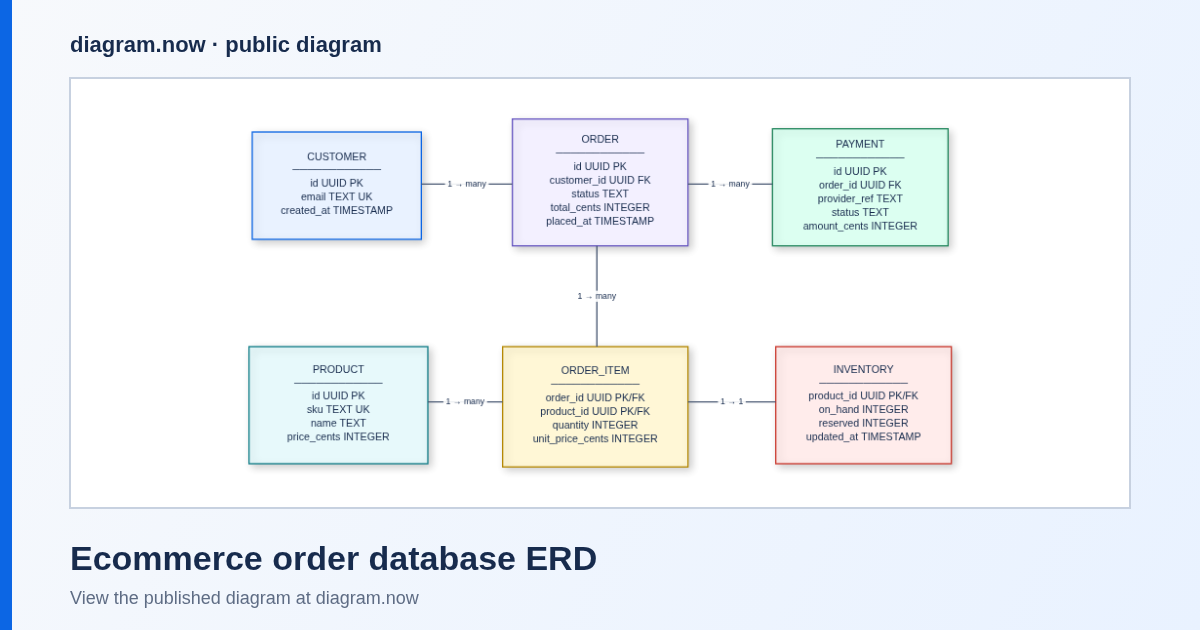
Foreign keys turn into crow's-foot connectors between entities, which is what makes the result a model rather than a box per table.
Each entity carries its attribute list, so the diagram answers “what is on this table” without a second document.
A generated ERD still needs naming, grouping and pruning for the reader. The point is skipping the part where you redraw twelve tables by hand.
The DDL is converted in the editor in your browser tab, and the encoded-URL format keeps the diagram in the address bar fragment instead of uploading it. A public page exists only if you publish one.
An ERD is most useful beside the spec it explains. From the editor you have three practical options: export a PNG for a page that only needs to be read; share the encoded URL or iframe snippet from the Publish / Embed / URL dialog; or, if the model has to stay editable inside Confluence pages, use the diagram.now app from Atlassian Marketplace — a separate product with its own install and pricing. See putting an architecture diagram on a Confluence page for the difference between the two, and ERD diagrams in Confluence for what a good ERD page contains.
Want a hand? Bring one schema to a free 20-minute observed session and leave with the diagram done.
The Import SQL ERD dialog reads CREATE TABLE with PRIMARY KEY, UNIQUE and FOREIGN KEY, plus ALTER TABLE ... FOREIGN KEY. The test run above used a table-level CONSTRAINT ... FOREIGN KEY ... REFERENCES and produced two entities plus one relationship.
Conversion happens in the editor in your browser tab, and the encoded-URL share format keeps the diagram in the fragment of the address bar rather than uploading it. Publishing a public page is an action you take explicitly.
Yes — the import places shapes on the current canvas, so you can keep editing, and you can also start from the public ERD example and reshape it into your own model.
Use the Use Sample button in the dialog to see the output shape first, or open the ERD example and edit a copy. If your model currently lives in a Mermaid diagram, turn Mermaid into an editable diagram instead.
No. This walkthrough is the standalone browser editor. The Confluence app is a separate Marketplace install; the free tier on that listing currently covers Confluence sites with up to 10 users, and larger sites are priced per user band on the listing.
Open the editor and paste one table, or open the public ERD and edit a copy. When the model becomes team documentation that must stay editable in Confluence, the Marketplace listing explains the install and the current rates.
Currently $0 for Confluence sites with up to 10 users. Bring one real diagram — Visio (.vsdx), Lucidchart, Mermaid or SQL — and we'll help you import it into Confluence in a free one-file migration session. Request migration help.